Sigma 50mm f/1.4 CL DG | Contemporary: B&H Photo / Amazon
Sigma Corporation (Headquarters: Kawasaki-shi, Kanagawa, CEO: Kazuto Yamaki) is pleased to announce the Sigma 50mm F1.4 CL DG | Contemporary. Housed in a small, lightweight and premium metal body, the lens combines a bright F1.4 aperture with rich textured rendering that gives images a unique expressive character. The CL, which is the start of a new lineage in Sigma’s I series line, harnesses the latest technology to achieve a classic aesthetic with beautiful tonal gradation, and is scheduled for release in early spring 2027.
| Launch: | Early spring 2027 |
| Product name: | Sigma 50mm F1.4 CL DG | Contemporary |
| Available mounts: | L-Mount, Sony E-mount |
| Supplied accessories: | Lens Hood LH520-04B / LH520-04S, Front Cap LCF-52 IV, Magnetic Metal Lens Cap LCF52-02MB / LCF52-02MS, Rear Cap LCR III, Pouch |
* Product appearance and specifications are subject to change.
* This product is developed, manufactured and sold based on the specifications of E-mount which was disclosed by Sony Corporation under the license agreement with Sony Corporation.
* L-Mount is a registered trademark of Leica Camera AG.
KEY FEATURES
- Aberrations intentionally controlled with the latest simulation technology for soft rendering of texture that helps the subject stand out
- Exceptionally compact for a large-aperture F1.4 prime, with the newly developed RDD autofocus actuator
- A new lineage for the I series primes designed to maximize the joy of shooting
Aberrations intentionally controlled with the latest simulation technology for soft rendering of texture that helps the subject stand out
The Sigma 50mm F1.4 CL DG | Contemporary is a premium compact prime lens that delivers a bright F1.4 aperture and rich textural rendering in a small and lightweight metal body. Its authentic optical system, housed in a barrel that is exceptionally small by the standards of today’s mirrorless lenses, was designed by making full use of the latest optical technology. Through exhaustive simulations, aberrations have been intentionally controlled to achieve a gentle softness within the in-focus plane, smooth and attractive bokeh, and characterful background rendering that helps the subject stand out. Conveying warmth and a natural sense of three-dimensionality across the entire frame, the lens is ideally suited to portraits and snapshots in particular. Its body distills the pure enjoyment of shooting with dedicated photographic equipment, while the latest technology perfects its impressive image quality, with supple rendering of texture and rich tonal gradation. Sigma hopes that the CL, the first in a new lineage of I series primes will help you discover and capture more beauty and joy in your everyday life.
Exceptionally compact for a large-aperture F1.4 prime, with the newly developed RDD autofocus actuator
Beautiful bokeh and three-dimensionality only a large-aperture prime can deliver
The lens features a classic optical construction of 9 elements in 6 groups with a whole-lens extension focusing mechanism. 3 aspherical elements and 1 FLD glass element are effectively arranged to achieve a compact and lightweight design. The optimal placement of the aspherical elements also successfully suppresses ghosting, which is difficult to avoid in small, lightweight lenses. Aberrations are precisely controlled while internal reflections are eliminated. The lens is designed so that its bokeh is at its most beautiful and its three-dimensionality at its richest at the maximum aperture of F1.4, offering superb rendering, especially in the beautiful, gradual transitions of its background bokeh.
New RDD (Rotary Direct Drive) actuator
To keep the overall length of the lens short, Sigma chose whole-lens extension focusing rather than an inner focus design. To handle the heavier focusing unit this creates, Sigma developed a powerful autofocus actuator in which coils and magnets, as used in the HLA (High-response Linear Actuator), are arranged in a circle to match the shape of the lens barrel. This minimizes any increase in outer diameter, resulting in a slim, high-torque autofocus mechanism.
Instant AF/MF switching with the focus ring
Taking advantage of RDD’s ability to drive the focusing optics directly, the lens temporarily switches to manual focus automatically when the focus ring is turned during autofocus operation. This allows photographers to work quickly in fast-changing conditions without needing to adjust AF/MF settings using a switch.
A new lineage for the I series primes designed to maximize the joy of shooting
All-metal body with premium quality and a pleasing feel in operation, the hallmark of the I series
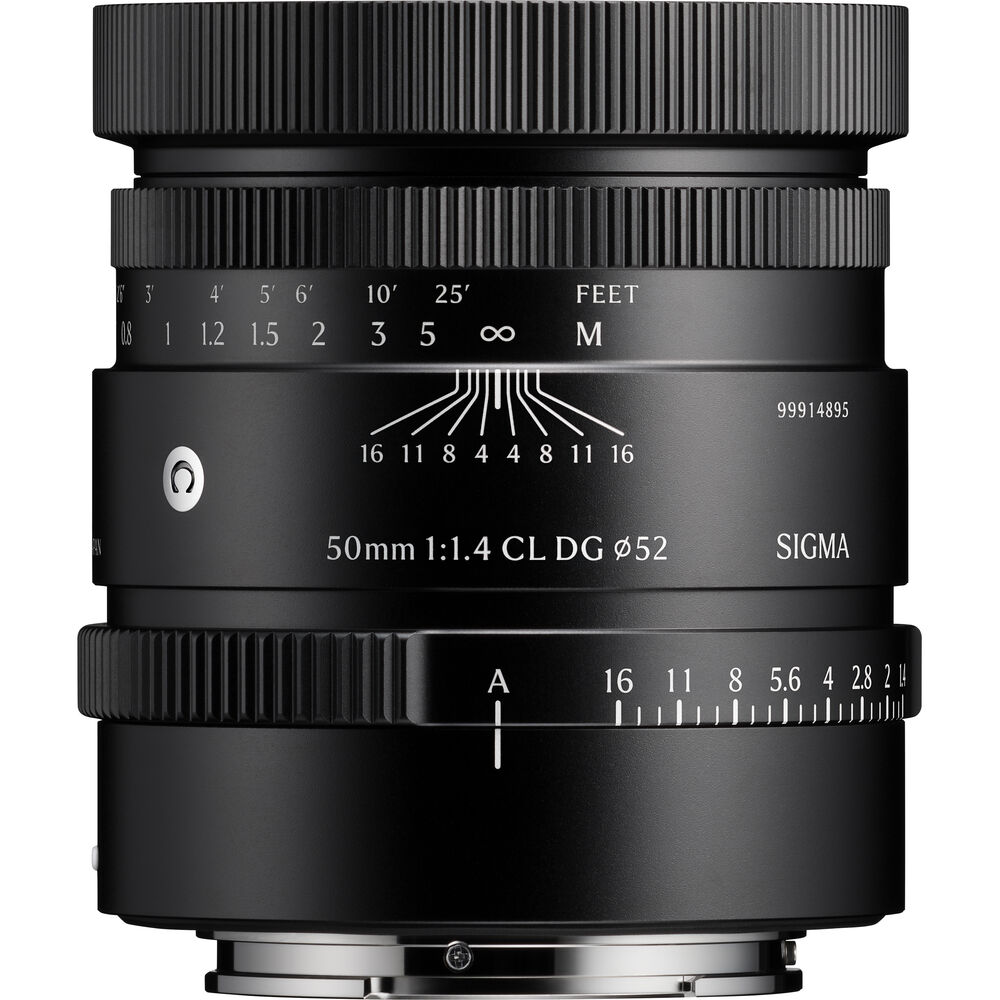
As the latest chapter in the I series, the “Premium Compact Primes” that pursue the joy of owning a photographic tool, the CL carries on the series’ all-metal body. Not only the knurled hood, focus ring and aperture ring but also the supplied magnetic metal lens cap have been inherited as signature elements of the I series identity.
Depth-of-field scale
The CL series features a distance scale that runs from the minimum focusing distance to infinity, together with a focus ring that rotates in direct sync with focusing. It is also equipped with a depth-of-field scale, which lets photographers visually check how the depth of field changes with the aperture value. These scales also serve as an icon of the CL, combining the very latest functionality with a classic aesthetic.
Dust- and splash-resistant structure* / water- and oil-repellent coating
In addition to a dust- and splash-resistant structure, the frontmost surface of the lens has a water- and oil-repellent coating applied, allowing photographers to shoot without concern even in harsh outdoor environments.
* The product is designed to be dust- and splash-resistant but is not waterproof. When using the lens near water, etc., take care not to allow large amounts of water to splash on it. If water gets inside the lens, it may cause a major malfunction.